
When we create a method, class or interface, we usually specify the type of the parameter and its return type.
For Example.
private void showValue(int val)
{
    MessageBox.Show(val.ToString());
}
Invoke the above function using
showValue(10); // 10 displyed in message boxThis will display 10 in the message box.
Now pass the string to the showValue function as shown below and you will get the compiler error “Invalid arguments” . That is because showValue function expects an integer and not a string;
showValue(“This is 10”); // Invalid arguments errorTo solve the problem what we do is write another overloaded function showValue which takes the string as input as shown below.
private void showValue(int val)
{
   MessageBox.Show(val.ToString());
}

private void showValue(string val)
{
    MessageBox.Show(val.ToString());
}
And invoke the above using the code
showValue(10);
showValue(“This is 10”);
Now both will work fine.
Table of Contents
Generic Methods in C#
Using Generics
In the above example, We have duplicated the code MessageBox.Show(val.ToString()) in both the functions. This works correctly, but it is not efficient. If we want to extend the function to handle double data type, then we need to write one more overloaded function repeating the code again.
The solution is to write the code once, which will handle all the types. And that is where generics come into the picture.
For Example, the above code written in a generic way
private void GenshowValue<T>(T val){
    MessageBox.Show(val.ToString());
}
And invoke the function using
GenshowValue<int>(10);
GenshowValue<string>("This is string");
GenshowValue<double>(10.7545);
Defining the Generic Method
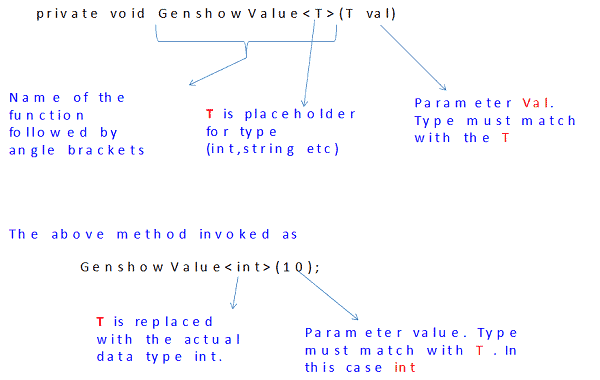
What is <T>
<T> is just a placeholder for the data type. It is more like a blueprint for the type. T is substituted by the actual type at the runtime.
Instead of <T> you can use <X> and is perfectly valid
private void GenshowValue<X>(X val)
{
   messageBox.Show(val.ToString());
}
Multiple Parameters
Generic methods can have multiple parameters.
private void GenshowValue<T>(T val1 , T v. inal2)Parameters can be of different types. In the example below the first parameter, val1 is of a generic type, while the second parameter val2 is of type int.
private void GenshowValue<T>(T val1 , int val2)You can have two generic type parameters of the different types as shown below.
private void GenshowValue<T, Y>(T val1 , Y val2)Invoked as
GenshowValue<int,string>(10, "This is string");Constraints on Parameters
We can specify the restrictions on the types of parameters using the where clause. A compile-time error is generated when you call your generic method with the wrong types
For Example
Where T:struct
The Value type like int, float, struct, etc. must be used as the parameter
private void GenshowValue<T>(T val) where T:structand if invoked as
GenshowValue<int>(10);                   //Works fine

GenshowValue<string>("This is string");  //Compile error because string is not value type

GenshowValue<double>(10.7545);           //Works fine
where T : class
Here reference types like string, class, arrays, etc. must be used as the parameter. Example :
private void GenshowValue<T>(T val) where T:classThe Constraints for multiple generic types is as follows
private void GenshowValue<T,Y>(T val) where T:struct where Y:structReturning a Generic type From a method
We can specify the return type from a generic method as follows
private T GenshowValue<X>(X val) {
    MessageBox.Show(val.ToString());
    return val;
}
Generic Classes
Like methods, classes can be made to act on generic types. The concept is very much similar to the method. In the example below, we modified the code GenshowValue and moved it into the class.
public class showValues<T> {
    public void show(T val) {
        MessageBox.Show(val.ToString());
    }
}
And invoked as
showValues<int> showInt = new showValues<int>();   //Generic class called with int type

showInt.show(10);

showValues<string> showString = new showValues<string>();  //Generic class called with string type
showString.show("This is string");

//showString.show(10);   //This will give compile time error
Generic Interfaces and delegates
The Interface and delegates can be made to use generic types similar to the class.
Advantageous of Using C# Generics
- Allows you to write code with a similar logic but can be applied to various data types. This enables you to reuse the code
- Allows you to write type-safe code as C# Generics are checked at the compile- time. If you use objects instead of generics, then casting to the correct type needs to be done at runtime.
- Using objects instead of Generics also has the problem of boxing/unboxing of value types or casting in case of reference types.
Conclusion
C# Generic programming allows us the create highly reusable code. Code that can be reused in many different places and situations. Generics allow us to create methods, classes, interfaces, and delegates that work with multiple types while still being type-safe.
Very good to add the ‘where’ in the generics part. Thanks for sharing!
where is complete c# tutorials
This is excellent, super well explained
Thank you , it was helpful , easy to understand.
having searching for an hour, this article has the best explaination
Thanks, this article was very helpful!
/Newbie .NET Developer.
Thank you for this guide. This helped me understand basics of generics.
/Newbie .NET Developer